
Stáhnout TPEE
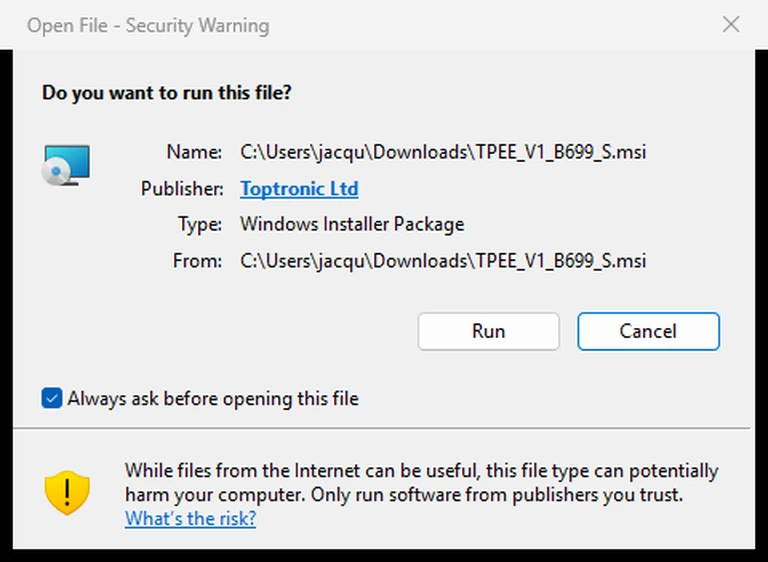
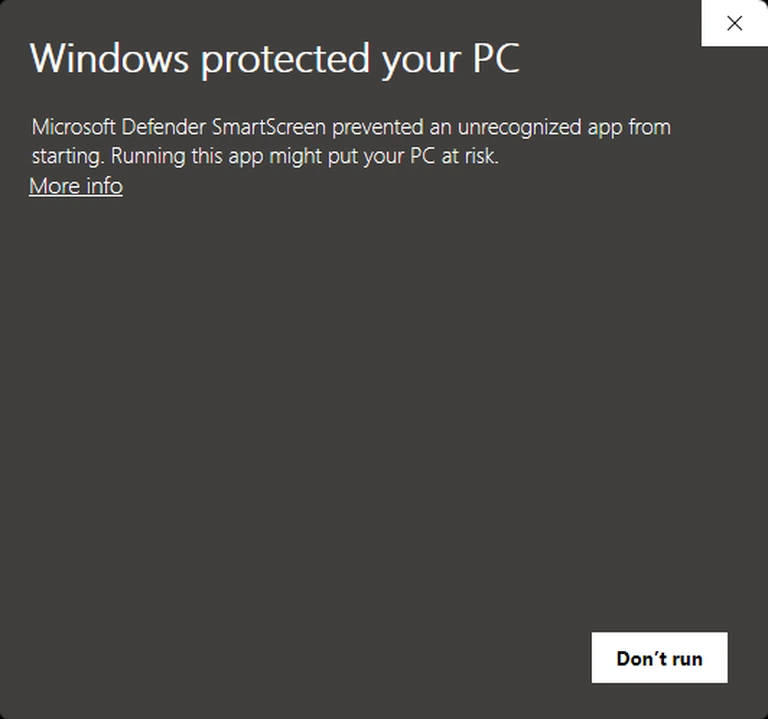
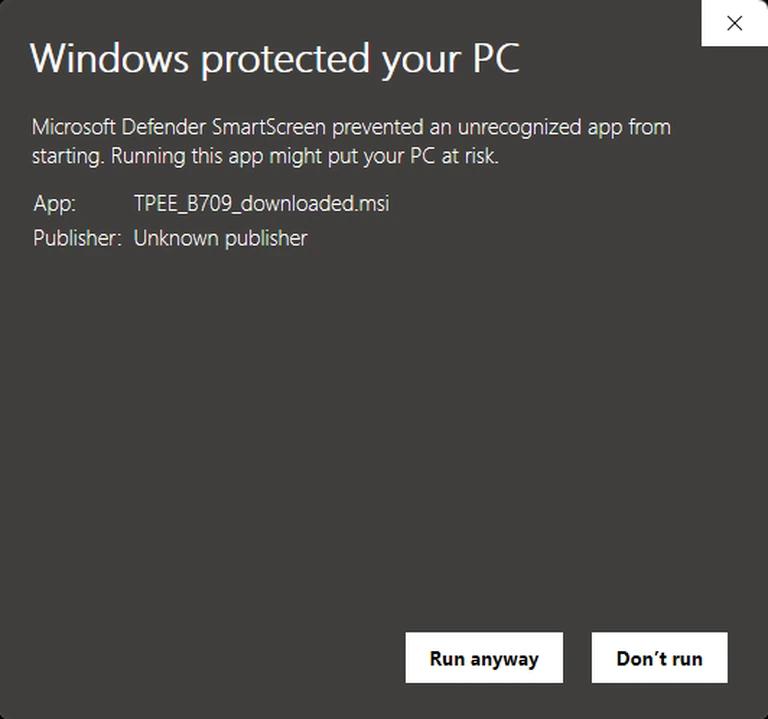
Windows shows one security dialog the first time you run the installer: press Run (the installer is signed in the name of Toptronic Ltd) - or, if it says Windows protected your PC, press More info and then Run anyway. Both dialogs are shown in real screenshots under the download button, in whatever language your Windows is set to.
Not bought TPEE yet? This page serves the build you own. To buy one — one-time USD $49, $99 or $299, no subscription, 14-day refund, Toptronic® Lifetime Warranty — start on the pricing page — or take the 14-day free trial first, on the home page, with no card.

Kontroluji váš odkaz ke stažení…
What this page serves right now.
Reading the release record…
The news log also lists builds we have published but not yet code-signed. Those are information only: they are not offered for download and not sold. A link for a build that has not been signed yet cannot exist, so selecting one in the news log will never start a download. Every line below serves the newest signed release, and your plan covers every signed release inside your updates window.
The Friday Drop
The Friday Drop — one email a week: the new build, the model changes, one lesson, one paper.
One list, sent on Fridays. Unsubscribe in one click from any of them. Privacy · Terms
Instalační program (doporučeno)
Stáhnout TPEE (instalační program MSI)The one dialog Windows shows before the installer runs
Windows asks once, and which dialog you get depends on the file, not on TPEE. The installer the shop sells is code-signed in the name of Toptronic Ltd, and this is what it looks like on a Windows 11 machine:
If instead you see "Windows protected your PC", that is Windows Defender SmartScreen, and it is the dialog our unsigned beta builds get: the two captures below are of one of them, which is why its publisher line reads "Unknown publisher" - that file carries no signature, and the signed release above does. Click More info, then Run anyway. Those two buttons are labelled in whatever language your Windows is set to, so they may read differently on your screen. Nothing is wrong with the file.
What the signature says, and how to read it
yourself. Every release we sell is code-signed with an Extended Validation certificate in
the name of Toptronic Ltd. Before you run anything, right-click the file, choose
Properties, open the Digital Signatures tab and read the signer's name; or run
powershell -NoProfile -c "Get-AuthenticodeSignature .\TPEE_V1_B716_S.msi | Format-List"
and read Status: Valid beside the Toptronic Ltd certificate. Then compare the SHA-256
this page prints below with certutil -hashfile TPEE_V1_B716_S.msi SHA256. If the name
or the hash is not what this page shows, do not install it - write to
support@tpee.app and we will answer.
Ověřte své stažení (SHA-256)
Po dokončení stažení spusťte ve Windows jeden příkaz a porovnejte výsledek s odpovídající hodnotou níže:
certutil -hashfile TPEE_V1_B716_S.msi SHA256A1B0C8564751346D9AE6E65752DD2E1D213C572DAFC3760CD88CF70028CDEDA9
Odkazy vyprší po 7 dnech nebo 5 staženích. Pokud váš vypršel, vyžádejte si níže nový — dorazí e-mailem.
What your PC needs
- Windows 10 or Windows 11, 64-bit. TPEE does not run on macOS, on Linux, on Windows on ARM or in a browser.
- Administrator rights for the install. The installer is a per-machine MSI:
it writes under
C:\Program Filesand registers the program for every account on the computer, so Windows asks for elevation once. After that TPEE runs as the ordinary user. - About 300 MB of free disk. The installer downloads as 52.3 MiB (54.8 MB); what it installs is the program (81 MB), its fonts, the board photographs the reference pages use, the three manuals and the Learning Center content - 568 files, 299 MB. Your own prompts are a few kilobytes each and live in your Windows profile.
- 4 GB of memory or more. A native program: no .NET, no Java, no Python, no Electron, and no GPU is used or required.
- No internet connection is needed - not to install, not to use it. No account, no licence server, no telemetry; the only two actions that can reach the network are Help > Check for updates, which also runs once at start-up until you untick it or a machine policy stops it, and Help > Send feedback, which is the one a person presses.
- One installer, one file. There is no ZIP on this page, and none for public download: the shop sells the signed MSI above. A portable ZIP is built for every beta build and published on the beta channel, where an enrolled machine reaches it with its own token.
- The editor speaks thirteen languages. Its own windows, menus, help cards and manuals are written in English, Arabic, Chinese (Simplified and Traditional), French, German, Japanese, Korean, Portuguese (Brazil and Portugal), Russian and Spanish (Spain and Mexico). The prompt text you write is in whatever language you type - the editor does not translate it.
And what the 14-day trial is: the full editor, no card, no account - a first name, a surname and an email address, and we send the download link. When the 14 days end the editor keeps working and simply stops receiving new signed releases; buying any plan starts your updates, and because tpee.app already knows your email the copy picks them up on its next check, so there is nothing to re-install. A copy out of its trial, like the Student licence, is not licensed for commercial use.
Potřebujete nový odkaz ke stažení?
Zadejte e-mail použitý při platbě. Pokud pro něj existuje objednávka, nový odkaz ke stažení je na cestě do této schránky.
On the beta team? The same email also carries the newest beta build, so you can choose the code-signed release or the test build.
Problémy? Napište na support@tpee.app — uveďte e-mail objednávky a číslo sestavení (265).
How releases arrive. We code-sign a new build in the name of Toptronic Ltd and publish it about every 14 days — not every day. Your plan covers a window of updates (4 months on Student, 6 on Starter, 12 on Professional and on the Gift of the Future) and every release we sign inside that window is yours. Builds we have not yet signed are not offered for download or sale. When that window ends the editor keeps working exactly as it does today — what stops is the arrival of new signed releases. A maintenance plan extends it, at the price that belongs to the licence you already hold, from the maintenance plans: 4 more months for USD $19, 6 for USD $59, 12 for USD $99, and the beta-tester rate of USD $59 for 12 months. While that plan is active it also covers your support, not only new builds: email support@tpee.app and we answer, and ask in the same email for a Microsoft Teams video call if you would rather talk it through: the support page says what is covered and what to put in the email.
When a build becomes downloadable. We publish release information as builds land, so the news log moves faster than the download does. The installer you can download changes on our code-signing schedule, which runs whenever a build has earned a signature - never more than a few days apart. The signed build currently offered is build 716, code-signed on 27 November 2026, and it replaced build 699. Its SHA-256 is published on the security page so you can check the file you downloaded. Builds we have not yet signed are listed for reference only - they are not offered for download or for sale, and the code-signed installer is the one to take.
TPEE on Linux, and on the Apple ecosystem
TPEE is a Windows program today. We are asked for Linux and for macOS often enough that we want to count the requests instead of guessing: put your name and your address on the list for the one you want, and we will write to you once — when that build exists. Your name is used to address the email, nothing else.